Have a YouTube video you'd like to show, but concerned about ads or students clicking on links? Copy the YouTube link from the video you would like to show. Go to ViewPure.com. Paste the link into the search bar and click PURIFY. The movie will appear on the ViewPure page without ads or side links. This is really helpful if you want students to access a movie independently.
Here's an example...
YouTube Movie: https://www.youtube.com/watch?v=rD9dwkrUf8s&index=3&list=PLnOthrFzmyrAwb093569Z8ZNOZQTf6yr8
ViewPure Version: http://viewpure.com/rD9dwkrUf8s?start=0&end=0
Showing posts with label Student Center. Show all posts
Showing posts with label Student Center. Show all posts
Sunday, January 24, 2016

Wednesday, January 20, 2016
Toolbox in ActivInspire
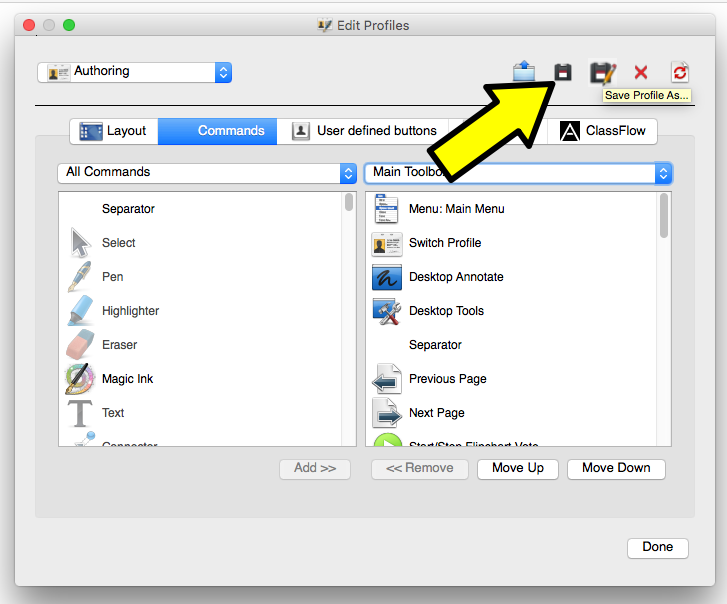
Here's how to change the setting of your toolbox in ActivInspire. This is very handy if you want to use your interactive board or Promethean Board as a center, but don't want your students to have access to everything.
1. Click on VIEW, then CUSTOMIZE.

2. Click on the Command tab. Then add or remove what you want your students to have access to. The menu on the left is what you have to choose from, while the menu on your right is the Main Toolbar. (If you click on Main Toolbox, you may choose Marquee tools - what shows up when you click on an object in ActivInspire). Add or remove want you want in the Main Toolbox.

3. Click on SAVE AS (disk with a pencil) to save these profile settings as a new profile or SAVE if its how you want the toolbar to be for you.
- **Click here if you would like to turn page turn gestures on or off.** < useful if using the interactive board as a Center.

Turning Page Turn Gestures On / Off in ActivInspire
1. Click on VIEW, then CUSTOMIZE.
2. Click on the Settings tab. Then, Dual Mode ActivBoards.

3. Check or uncheck the box (based on your preference) next to "Enable page turn gestures."

4. Click SAVE (or Save-As if you want this profile to be a special profile with or without turn page gestures).
Ideas for Using Interactive White Boards or Promethean Boards as a Center
Your interactive board can be used for many different types of Center activities AND a good way to differentiate. Here's some ideas on how to use your Interactive White Boards as a Center...
Promethean Boards (1 User)
Promethean Boards (1 User)
- Flipchart with a student's name assigned to each page
- Easy to differentiate instruction
- Over a couple days each student would get a turn to do their page.
- Flipchart that students each get a turn to use.
- I would put a color coded star next to their name on my center chart. Each group would be divided in half so 1/2 the group would be at the board one day, then the other half the next day.
- Can differentiate by having 2-3 pages where groups are assigned to a specific page
- Interactive Website or Program - like ThinkCentral, Starfall, Pixie, Kidspiration
- Project worksheet or graphic organizer for students to annotate using Desktop Annotate through ActivInspire
Epson Projectors in Computer Mode (Using Touch for Second Student)
- Flipchart with a student's name assigned to each page
- Flipchart that students share
- 1 student on pen, 1 student on touch if the activity requires writing
- Up to 6 students could be at the board at once if they are only manipulating objects.
- Interactive Website
- Project worksheet or graphic organizer for students to annotate using Desktop Annotate through ActivInspire OR turn off Touch Input and have them write using the white board and dry erase marker. Can also use the document camera to project something for students to write on.
Epson Projectors in Projector Mode (2 students on pen, 2-6 students using finger but must agree to the tool they will use - erase or write).
- Flipchart, document, document under document camera, or website that students can annotate over but not have to manipulate the document (turning the page, scrolling up or down).
Epson Projectors with Dual Mode in ActivInspire (max - 2 students on pens, 1+ students on touch (but students using touch must agree on what tool they are using :)). **Requires a request for a driver update through SchoolDude to make Dual Mode functional on our computers.**
- Flipchart with a student's name assigned to each page
- Flipchart that students share
- 2 students on pen, 1 student on touch - all 3 can write and interact with the flipchart independently
- Up to 6 students could be at the board at once if they are only manipulating objects.
- Interactive Website (only 1 student can use a website because websites are designed for only 1 user at a time).
- Project worksheet or graphic organizer for students to annotate using Desktop Annotate through ActivInspire OR turn off Touch Input and have them write using the white board and dry erase marker. Can also use the document camera to project something for students to write on.
Work done in flipcharts can be printed out as evidence of student work for assessments or be sent home. Click here to see how to print out flipcharts.
Click here to learn how to change what buttons are available to students in the ActivInspire toolbar.
Click here to turn on/off page gestures in ActivInspire.
Some ideas for Centers...
Don't forget to check out Promethean Planet!
Language Arts
Click here to turn on/off page gestures in ActivInspire.
Some ideas for Centers...
Don't forget to check out Promethean Planet!
Language Arts
- Word Work activities - there's an alphabet chart you can use as a template available in the browser of ActivInspire or ask me (Corey) for a template.
- build words - say it, make it, write it.
- Embed sound files - record your self saying a word and students have to write it or make it with letters
- Finding letters, words, spelling patterns, syllable parts by highlighting or circling.
- Name Recognition / Get to Know You Activities - take students pictures and put them into the flipchart to match with their name or spell using the letter tiles
- Writing letters or spelling words practice
- Written response to a task
- Reading Center - poem, article, online text (like texts from Raz-Kids or Starfall).
Math
- Interactive tools - calculator, ruler, protractor, dice, timer
- Writing numbers
- Solving Math Problems
- Acting out Math problems
- Showing how to make a number in different ways
Art
- Drawing a picture to be used in a story (digital or print out)
Science
- Measurement tools - thermometer, balance, scale templates available in the Browser and on Promethean Planet
Subscribe to:
Posts (Atom)