- How to Create Drag and Drop Activities with Google Slides by ShakeUpLearning - Apple Tree Activity
- Using Google Slides to Makea. Drag & Drop Activity by Michelle Austin - Math Number Sort Activity
Showing posts with label Google Apps. Show all posts
Showing posts with label Google Apps. Show all posts
Wednesday, March 25, 2020
Creating Interactive Lessons Using Google Slides
Here's some YouTube tutorials for creating interactive lessons using Google Slides...

Sunday, March 22, 2020
Additional Tech Posts
Here's some additional tech posts shared by the Librarians in my district...
Google Apps (Docs, Slides, etc) training https://teachercenter.withgoogle.com/training
Distance Learning training from Google https://edu.google.com/latest-news/covid-19-support-resources/?modal_active=none&topic=distance-learning-training
Getting Started with Google https://teachercenter.withgoogle.com/resources/general?tags=gettingstarted
Special needs accessibility https://teachercenter.withgoogle.com/resources/general?tags=specialneeds
Tuesday, August 9, 2016
docAppender Google Forms Add-On
docAppender works with Google Forms. It takes what is put into a Google Form into a Google Doc for you. This is great if you would like to use Google forms to take notes while working with students or parents. The information is exported to a Google Doc based on your preference - vertical table, horizontal table, or bulleted list. For example, if you are taking notes in a Google Form about a writing conference with a student, the information will be collected in a Google Doc specific to that student for you. This is great if you want to go paperless or have access to your notes anywhere anytime without dragging a binder around.

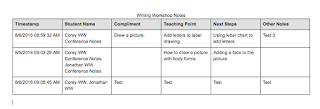


Ways to use docAppender:
- Note taking on student's skills, academic progress, or behaviors.
- Note taking on parent / teacher communication.
- Quiz / Test Taking / Quick Checks for students to take and teacher grades in Google Doc.
- Feedback / Survey
Subscribe to:
Posts (Atom)